Unlock your workflow’s potential with these top 10 automations designed to boost efficiency. Streamline tasks and reclaim your valuable time effortlessly!
Understanding Workflow Automation
Automation is not a new concept, but its applications have expanded significantly with advances in technology. From simple task automation to complex process management, the scope of what can be automated has grown, offering immense potential to businesses of all sizes. Whether you are a solopreneur or part of a large enterprise, adopting automation can lead to significant improvements in how you manage your work.
The core idea behind workflow automation is to create a seamless, efficient process that requires minimal human intervention. By mapping out workflows and identifying areas where automation can be introduced, businesses can reduce operational bottlenecks, improve consistency, and enhance overall performance. In the following sections, we will delve deeper into the benefits of automating your workflow and explore some of the top automation tools available today.
Benefits of Automating Your Workflow
Automating your workflow offers a multitude of benefits that can transform the way you work. One of the most significant advantages is the reduction in manual errors. Human errors are inevitable, especially when tasks are repetitive and mundane. Automation ensures that these tasks are executed with precision, reducing the likelihood of mistakes and ensuring a higher level of accuracy.
Another major benefit is time savings. By automating routine tasks, you free up valuable time that can be redirected towards more strategic activities. This not only enhances productivity but also allows for better utilization of your skills and expertise. Time saved from automation can be invested in innovation, problem-solving, and other critical areas that drive business growth.
Cost savings is another compelling reason to embrace workflow automation. By reducing the need for manual labor and increasing efficiency, businesses can lower operational costs. Automation tools can handle a high volume of tasks at a fraction of the cost of manual processes. Additionally, automation can lead to faster turnaround times, improving customer satisfaction and potentially increasing revenue.
Key Areas for Workflow Automation
To maximize the benefits of workflow automation, it’s essential to identify the key areas within your organization where automation can have the most significant impact. One such area is administrative tasks. These often include scheduling meetings, sending follow-up emails, and managing documents. Automating these tasks can significantly reduce the administrative burden on your team, allowing them to focus on more critical responsibilities.
Customer service is another area ripe for automation. Chatbots, for example, can handle a wide range of customer inquiries, providing instant responses and freeing up human agents to deal with more complex issues. Automation can also streamline the process of managing customer feedback and support tickets, ensuring timely and efficient resolution of customer concerns.
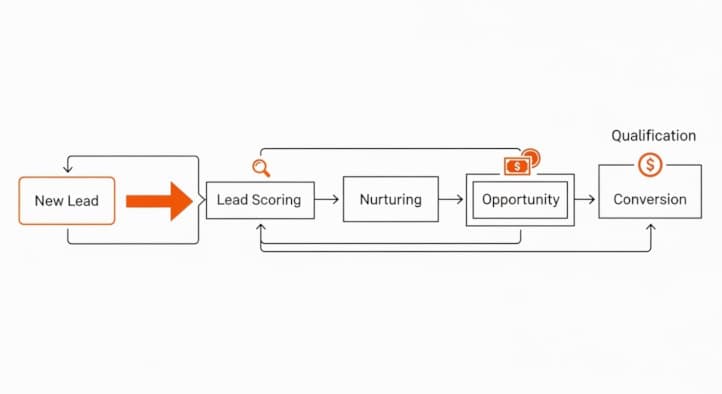
Marketing and sales processes can also benefit immensely from automation. From lead generation and email marketing to customer relationship management (CRM), automation tools can optimize these activities, leading to improved lead conversion rates and better customer engagement. Automating repetitive marketing tasks allows your team to concentrate on crafting creative strategies and building stronger customer relationships.
Top 10 Automations to Consider
- Email Marketing Automation: Email marketing automation tools like Mailchimp and HubSpot can help you schedule and send personalized emails to your audience, track engagement, and analyze campaign performance. This ensures consistent communication with your customers without the need for manual intervention.
- Social Media Management: Tools like Hootsuite and Buffer allow you to schedule and manage your social media posts across multiple platforms. Automating social media activities ensures a steady online presence and allows you to analyze engagement metrics to refine your strategy.
- Customer Relationship Management (CRM): Automating CRM processes with tools like Salesforce or Zoho CRM helps you manage customer interactions, track sales pipelines, and automate follow-ups. This leads to improved customer relationships and a more efficient sales process.
- Project Management: Tools like Asana and Trello help automate project tracking, task assignments, and progress monitoring. By automating these aspects, project managers can ensure that deadlines are met and team members stay aligned with project goals.
- Invoice and Payment Processing: Automating invoicing and payment processing with tools like QuickBooks or FreshBooks ensures timely billing and payment collection. This reduces the administrative burden and improves cash flow management.
- Customer Support: Implementing chatbots and automated ticketing systems like Zendesk can enhance your customer support operations. These tools can handle common inquiries and route complex issues to human agents, ensuring efficient and timely resolution.
- Data Entry and Management: Automating data entry and management with tools like Zapier can eliminate the need for manual data input, reducing errors and saving time. This is particularly useful for tasks like updating databases and transferring information between systems.
- HR and Recruitment: Automating HR processes such as payroll, benefits administration, and recruitment with tools like BambooHR or Workday can streamline these functions and ensure compliance with regulations. This allows HR teams to focus on strategic initiatives like employee engagement and development.
- Inventory Management: Tools like TradeGecko or Cin7 can automate inventory tracking, order management, and stock replenishment. This ensures that you maintain optimal inventory levels and avoid stockouts or overstocking.
- Document Management: Automating document management with tools like DocuSign or Google Workspace can streamline document creation, sharing, and storage. This improves collaboration and ensures that important documents are easily accessible and securely stored.
Choosing the Right Automation Tools
Selecting the right automation tools is crucial for maximizing the benefits of workflow automation. The first step is to identify your specific needs and objectives. Consider the tasks and processes that consume the most time and resources, and prioritize automation solutions that address these areas. It’s also important to evaluate the scalability of the tools, ensuring they can grow with your business.
Researching and comparing different tools is essential. Look for reviews and case studies to understand how the tools have performed for other businesses. Consider factors such as ease of use, integration capabilities, and customer support. It’s also beneficial to take advantage of free trials or demos to get a hands-on experience with the tools before making a decision.
Budget is another critical factor. While some automation tools can be expensive, it’s important to consider the long-term return on investment. A slightly higher upfront cost can be justified if the tool significantly improves efficiency and productivity. Additionally, many tools offer tiered pricing plans, allowing you to start with a basic plan and upgrade as your needs evolve.
Integrating Automation into Your Daily Routine
Once you’ve selected the right automation tools, the next step is to integrate them into your daily routine. Start by mapping out your existing workflows and identifying the specific tasks that will be automated. This will help you understand how the automation will fit into your overall process and ensure a smooth transition.
Training and onboarding are crucial for successful integration. Ensure that your team is well-versed in using the new tools and understands the benefits of automation. Provide comprehensive training sessions and create user guides or tutorials to help them get up to speed. Encouraging a culture of continuous learning will also help your team adapt to new technologies more effectively.
Monitoring and optimizing the automation process is an ongoing task. Regularly review the performance of the automation tools and gather feedback from your team. Identify any issues or bottlenecks and make necessary adjustments to improve efficiency. Over time, you may discover additional areas that can be automated, further enhancing your workflow.
Measuring the Impact of Automation on Productivity
Measuring the impact of automation on productivity is essential to understand its effectiveness and justify the investment. One of the key metrics to track is time savings. Compare the time taken to complete tasks before and after automation to quantify the efficiency gains. This can be done through time tracking tools or by analyzing workflow data.
Another important metric is error reduction. Automation tools are designed to minimize human errors, so tracking the frequency and severity of errors before and after implementation can provide valuable insights. Reduced errors not only improve productivity but also enhance the quality of work and customer satisfaction.
Employee satisfaction and engagement are also important indicators of the impact of automation. Conduct surveys or gather feedback from your team to understand how automation has affected their work experience. Improved job satisfaction often leads to increased productivity and lower turnover rates. Additionally, tracking key performance indicators (KPIs) related to specific processes can help you assess the overall impact of automation on your business goals.
Common Challenges and How to Overcome Them
While workflow automation offers numerous benefits, it also comes with its own set of challenges. One common challenge is resistance to change. Employees may be hesitant to adopt new technologies, fearing that automation will replace their jobs or disrupt their routines. To overcome this, it’s important to communicate the benefits of automation clearly and involve employees in the decision-making process. Providing adequate training and support can also help ease the transition.
Another challenge is the initial cost and implementation time. Setting up automation tools can require a significant investment of time and resources. To mitigate this, start with a phased approach, automating one process at a time. This allows you to manage the implementation more effectively and demonstrate quick wins to build momentum for further automation.
Compatibility and integration issues can also pose challenges. Ensuring that your automation tools seamlessly integrate with your existing systems is crucial for a smooth workflow. Conduct thorough testing and work closely with your IT team to address any compatibility issues. Choosing tools with robust integration capabilities can also help minimize these challenges.
Case Studies: Success Stories of Workflow Automation
Real-world examples of successful workflow automation can provide valuable insights and inspiration for your own implementation. One notable case study involves a digital marketing agency that implemented automation tools to streamline their client reporting process. By automating data collection and report generation, they reduced the time spent on these tasks by 70%, allowing their team to focus on strategy and client engagement.
Another success story comes from a manufacturing company that automated their inventory management process. By using an automated inventory tracking system, they achieved real-time visibility into their stock levels, reducing stockouts and overstocking issues. This not only improved operational efficiency but also led to significant cost savings.
A third example is a customer service department that implemented chatbots to handle common inquiries. The chatbots were able to resolve 60% of customer queries without human intervention, freeing up customer service agents to address more complex issues. This resulted in faster response times and higher customer satisfaction levels.
Conclusion and Next Steps for Implementation
Workflow automation has the potential to revolutionize the way you work, unlocking efficiency and boosting productivity. By understanding the key areas for automation, selecting the right tools, and integrating them into your daily routine, you can streamline your operations and focus on what truly matters. The benefits of reduced errors, time savings, and cost efficiencies far outweigh the initial investment and challenges.
To get started with workflow automation, begin by identifying the tasks and processes that can be automated. Research and select the tools that best meet your needs, and involve your team in the implementation process to ensure a smooth transition. Continuously monitor and optimize your automation efforts to maximize their impact on productivity.
As you embark on your automation journey, remember that the goal is not just to replace manual tasks but to create a more efficient, effective, and enjoyable work environment. Embrace the possibilities of automation, and unlock the full potential of your workflow.
See how much you are losing by scanning your website strategy today!